Showing posts with label i7500. Show all posts

Friday, 10 September 2010

Samsung Galaxy i7500 Updater by drakaz : Easy way to update your phone

having moved on from my bad experiences of the Samsung i7500 Galaxy (its a good phone, just that Samsung seemed to 'forget' it ever existed so it was stuck on 1.6) to a Google Nexus One.

But I still keep an eye on things to see what the community is doing, as many still have the phone and cant afford to change.
Ive got one in my cupboard doing nothing too!

So I was pleasantly surprised to find some great new work by drakaz, making it so easy to root and update to custom ROMS.

There are two roms GOASP and Galaxo which you can choose from. Reckon I'll dust off the i7500 and get it flashed ASAP as a backup.
In fact if this had been available a few months ago I may well have stuck with the Galaxy :-)


Easy Root (required for next step)


Galaxy Updater

will update as to how I get

Monday, 22 February 2010

Android 1.6 unofficial release for Samsung Galaxy i7500

unofficial but seems like 1.6 is around .......

I7500XEFJB2

from what I know this is a key release to porting to 2.0/2.1 if Samsung dont do it officially.

goasp and mustymod currently working on a version too.

more news later

Thursday, 15 October 2009

success! H6 to I4 firmware O2 UK Samsing I7500 using NPS

I backed up my installed apps to sd card using Astro first.

uninstalled the previous NPS
downloaded the new NPS
still wouldnt recognise the phone , no options in the upgrade dropdown WTF !
Anyway I manually uninstalled (via AddRemovePrograms in Control Panel) , NPS AND all the associated drivers one by one.
then restarted PC and reinstalled NPS
This time it worked!
only mode available is upgrade (i.e. the rest of the software is useless , you cant even backup!)

phone restarted just fine.
I have not done a reset yet
As reported in the forums the keyboard has changed , and for me it was no longer popping up when trying to create a text message (at this point I got worried).
However going into Gmail and creating a message and it started to work :-)

this may not be an issue if you reset the phone after the upgrade.
All data remained including apps.
I4 has the new switchers widget to toggle settings
Be interesting to see how the battery life is now .....


From Johns Car Blog

Wednesday, 7 October 2009

patience is wearing thin...Samsung I7500 switches off

phones been running well , no forced closes , good battery life ...
then over the last 2 days Ive had 2 instances when the phones just switched off!!!!

Only things Ive done differently are
1. performed a lot of application updates (either thru market , but mostly via aTrackDog (superb app btw))
2. added the Calendar widget to the RH desktop

ho hum, on both ocassions I needed to physically remove the battery to allow me to switch back on (long press on end call button)

Not impressed.
Im stuck on H6 firmware , I have always maintained I would try and upgrade officially via NPS software but if this continues I'll be doing it manually as I believe the later firmwares are better.

However as we all know , better the devil we know and H6 for me is in general pretty stable.

To Samsung : this phone is good but if all the bugs were ironed out and NPS was fixed fully this would be a class leader. missed opportunity.....

Wednesday, 30 September 2009

30k service GTI due / Seat Ibiza Sport 1.4 mpg / i7500 home screens

eeek , the service indicator popped up today !
last service was 20k in march, now thats a bit quick.

From Johns Car Blog

Seat Ibiza 1.4 Sport MPG
used for commuting to work , while Amy uses the GTI !

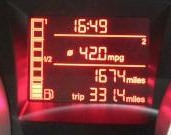
330 miles @ 42 MPG
(yes thats over 10mpg up on her usual commute , must be the driver lol)

From Johns Car Blog

Samsung i7500 home screen shots
reckoned it was time to show my phone

Main home screen
Note the 'hero' style Weather Widget Donate
as well as the Battery Status Donate
both look great , perform well and dont drain your battery, so well worth paying for.

From Johns Car Blog

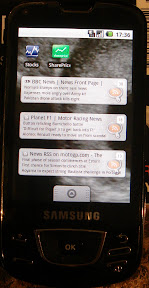
and the left swipe screen is
with RSS feed widgets and share price apps

From Johns Car Blog

right swipe screen is just various links for other apps but kept clear.

standard android has 3 screens (Left/Middle/Right) , but you can get more if you root and add a home replacement pack.

Monday, 21 September 2009

CoPilot Sat Nav for Android / Samsung i7500 Galaxy

well after using TomTom on my N95 (with a seperate GPS bluetooth unit) , it was time to try something new.

TomTom has yet to release an Android version (they have just released Iphone version though)

There are a few free android sat nav apps but by far the (only) paid option is

CoPilot 8 for Android

available from the Android Market for ?25


heres a review of TomTom VS CoPilot (on the Iphone but same really)
http://www.iphonetunes.net/index.php/apps/comments/iphonetunes_review_copilot_live_vs_tomtom/


so far so good , works well.
Had a few issues initially , as once youve downloaded the app , you need to then download maps.
You can do this via the phone (WiFi only) or using a windows app
I chose to update via WiFi to my home router.
Download was seamless but CoPilot crashed once while loading the maps.
However all is OK now (I only have UK maps 187MB)

clear display , updates quickly , my only gripes are the voices are too late (but I think this is a system setting)
Button presses are slightly delayed while going through the menus but it becomes normal after a while, and the voices themselves are a little 'mechanical' compared to TomTom

One key point is you need a car charger !!!!
because the battery live is shocking at the best of times , but running GPS on it dies very quickly.

so far so good and its nice to have a change.

Wednesday, 16 September 2009

android app : Astro : easy list installed apps and track for new updates

new to this android lark but always wanted a quick way to see what apps i have installed and keep them up to date.


Quick trawl of the interweb and the recomended candidate looks to be aTrackDog (http://www.cyrket.com/package/com.a0soft.gphone.aTrackDog).
Reviews all your installed apps and checks if an update is available , then links to store if you want to update! marvellous...
And today I found out if you hit Settings/Export Apps List , you can sent an exported list by txt or email ......
so heres mine.

Exported by aTrackDog at 07:44:17 2009/09/16

FeedR,1.0.35
Google Maps,3.1.2
Listen,1.0.0
OI File Manager,1.0.0
Abduction!,1.3
Advanced Task Killer Free,1.4.4
Aldiko,1.1.2
Astrid,2.9.0
ASTRO,1.4.1
aTrackDog,2.54
Battery Status,1.2.1
beebPlayer,0.4.9
Bluetooth Device Address,1.0.0
Bubble,1.7
Camera Firmware,1.0
com.samsung.InputEventApp,1.0.0
com.test.version,1.0.0
CSC,1.0
CurrentDataState,1.0
DataCopy,1.0
Deathclock,1.2
Factory Test,1.0
FartDroid,4.2.1
FileCopy,1.0
Finance,1.1
Google Sky Map,1.1
GPS Speedo,2.1
GPS Tracker,1.9.3
imeem Mobile,2.1.6
KeePassDroid,0.5
Layar,2.1
Locale,0.660 beta
Movies,1.6.1
MusicPlayer,1.0
My Tracks,1.0.5
Opera Mini,4.2
Places Directory,1.0.16
Quote Pro,1.2.4
Rehearsal Assistant,0.8.2
Retro Clock,1.1.1
RilErrorNotifier,1.0.0
Ringdroid,2.1
Ringo Lite,1.2.6
SharePrice 1.2.2,1.2.2
ShopSavvy,3.5.2
ShutdownApp,1.0
SlideME App Installer,1.0
Spare Parts,1.5 Only
SportsTap,2.2
Star Tour,1.0
Stocks,0.3.5
TestGPS,1.0.0
The Weather Channel,2.0.18
Toggle Settings,2.1.2
TSP firmware,1.0
Weather Widget Forecast Addon,1.2
Weather Widgets,2.4.1
WeatherBug,1.5.93
Wikidroid,1.3.1
Wikitude,7.5
WlanTest,1.0.0
wssyncmlnps,1.0.0

Total 62 applications

cool eh? means I can provide feedback on each in my blog.
Astro is a file manager utility , but you can also set up a 'backup' directory (make it the sd card , /sd) in the preferences , then export all apps (.apk) to the card.
Very handy cos I want to update my firmware and I want to be able to re-install my apps quickly.

[update Aug 2010 : this is all now superflous with the arrival of AppBrain (website and android app) , which allows sync between phone and web. The website allows you to link and summarise all your installed apps, as well as queuing for install the next time you sync]

Tuesday, 15 September 2009

post to your blog from igoogle and googlemail / H8 firmware for i7500 / Battery Status Donate

easy peasy !
Posting to Blogger from igoogle and googlemail

all they need is a decent app for android for blogger and Im sorted lol

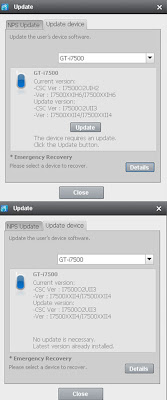
New H8 i7500 firmware released, however I cannot get the Samsung suite to recognise the phone yet ! (a common problem from reading the forums apparently)
I could do it using an uploader (Odin) but Id rather not for now........

heres what the update page looks like if I ever get to it !

downloaded the Battery Status Donate , another Android Apps widget (I also use the Weather Widget for 'Hero' like clock).
Seems good and doesnt drain battery. Another top app , and different battery skins available. Highly recommended

Thursday, 10 September 2009

Samsung i7500 HTC Hero clock/weather widget / battery life again! / first ever reboot

HTC Hero look alike home screen clock and weather

any self respecting android user loves the HTC Hero SenseUI interface (a wrapper on Android 1.5)
now the Hero is laggy (although that may be fixed in a new firmware update) and if youre like me youve chosen the Samsung i7500 which has plain ol 1.5.
There are 2 options

1 : flash a custom HERO look a like rom onto the galaxy (i7500), there are some available.
Steps can be found on the web

or

2: install some cool widgets or home replacements that mimic the effect.

I want to keep a quick ui so I chose the widget option for now.
The key thing is that you have to be careful , as the wrong widget and your battery life will be shot........

I narrowed it down to
Beautiful Widgets
or
Weather Widget Donate
(which also allows you to get the forecast widget)

I chose the later after seeing a few places state some battery drain for the first one.
Weather Widget Donate works great , I have no lag issues , no increased battery drain and it looks slick.....highly recommended

(although I see that the Beautiful Widgets has just been updated completely and looks just as good, in fact includes 24hr support and hi/lo temp display), very tempting if I hadnt bought already lol

heres its installed, note that its a combined clock and weather skin.
From Johns Car Blog

(note how I also installed the Battery Status - free by them too. Both have free downloadable skins to allow you to customise the battery visuals, check out Lock 2.0 skin gallery
Dont be confused, the site details many things.

You can get skins for
1. Lock screen (I dont use this)
2. Weather + Clock combined widget
3. Battery widget
You use it to find the one you want , then from the phone you can download them now you have a name to use...
Im using the glass one just now , so the background shows through :-)
You can get to the settings by tapping the widget, it now shows the current and 3 day forecast.
Then press the menu button and 'settings' , there are 2 'skin' options , one for weather , one for battery.
Enjoy
)

Samsung i7500 galaxy battery life update
Now runs for one full day with most toys enabled :-) 3G/Data sync but not GPS. down to 35% by 11pm
Reckon if i turned 3g and sync off I could now get 2 days out of it.

I see the battery has an extended capacity cousin , so it wont be long before someone releases an extended battery and rear cover to improve the life , woohoo


First ever screen lockup and reboot on i7500!
Phones never been off since I got it, but today I tried to unlock it and it went unresponsive on the draw pattern to unlock screen eek!
then the android title came up and it rebooted , then I found the data connection was dead!
In the end I had to switch it on and off again and enter my sim pin code.
(first reboot seemed to not allow me to log into my pin lock)

Tuesday, 1 September 2009

samsung i7500 galaxy new user tips part 2

Unable to send text messages on O2
couldnt send any text messages , could receive them and make calls ....
would always get a 'message not sent' icon in notification bar
turns out the message centre number was wrong and had '61500' appended to the correct number.
edited it to remove the extra numbers and voila its working

Making sure the alarm function works!
Ive already mentioned TasKiller as the ultimate app to save battery life by killing background apps.
However I was a bit zealous last night , set my 6.20 am alarm then killed the process......
The alarm icon was present so i assumed it was gonna be ok........
I was however wrong , it didnt go off at all FFS

so dont kill Alarm process if you want to get up for work (seems obvious doesnt it !)


battery life seems better today after the 4th full charge.
funnily enough its takes AGES to charge from 99% to full.
its now 17 hrs from 100% and its now at 60% , much better.

still loving it :-)

Friday, 28 August 2009

N85 8GB is dead , long live the Samsung I7500 Galaxy

Well after several months of waiting the Samsung I7500 (Galaxy) is now here in the UK.
After 3 phonecalls yesterday , I finally got someone who knew about the phone and was prepared to take my upgrade request...
the box was delivered today , so after a charge , it was time for a ply

After a long line of nokias , its time for android.
My last phone was the N95 8GB


Initial impressions are very favourable , slick quick interface with my first touchscreen.
The screen (AMOLED) is a joy to behold. Now to start downloading apps.
i have already turned off autosyncing to save battery life!

I'll let you all know how it goes........