Showing posts with label android. Show all posts

Wednesday, 18 August 2010

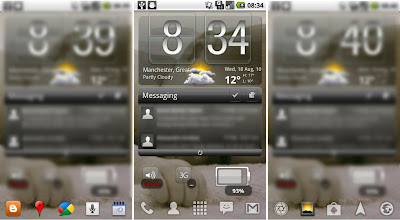
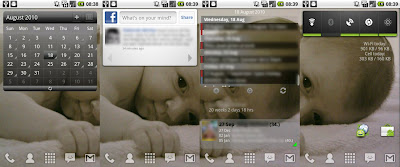
DDM screenshot : Nexus One screens with Launcher Pro installed

reckoned I would also try using DalvikDebugMonitor to take screenshots of my current 5 homescreens.

tips can be found
http://www.talkandroid.com/guides/how-to-take-screenshots-on-your-nexus-one
(note : you dont need to download the drivers, they already come in the SDK download under usb-drivers folder)

Nexus One / Froyo 2.2 non rooted
Launcher Pro so i have 5 homescreens centered around the one below.
Theres three to show the scrollable dock (the icons at the bottom) of LP that is sooo useful and cleans up your desktop of icons.
just swipe left or right to get a new set. fully customisable to any apps you want.


these are the other 4 (2 either side of center) of the screen above

Tuesday, 17 August 2010

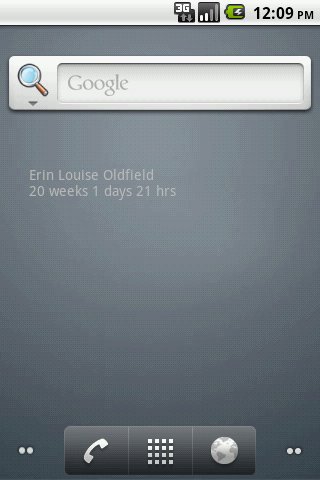
weeksSinceBirth.apk : first noddy Android Widget

had a counter on my XP desktop at work for how old my daughter is in weeks, reckoned I could do with the same on my Nexus One

Scoured AppBrain /AppStore for any useful countdown/countup timers. But alas some were just applications (not widgets) , others wouldnt count up ! and others wouldnt shows weeks (first yr of life usually has milestones in weeks)
scarcely believable but in the end I gave up and decided to install AndroidDeveloperTools plugin for Eclipse and have a go myself.

really noddy at this stage but a working widget that updates every hr.


TODO wishlist

allow date/time picker for entering date.
(and laterly pick up DOB from contacts as well)
allow font type/size and colour changing
allow background image toggle/gradient fill
allow configurable update period

of note I did find this which I've also installed and is pretty slick.

Thursday, 22 July 2010

Launcher Pro Beta


Launcher replacement , the bit that fires when you hit the home soft key etc.
Currently on eclair waiting for vodafone to agree to epf30 froyo ota update.  (edit : as of 21st July 2010 I am on Froyo)
Stock eclair comes with just one dock icon that launches the app display, or recycle bin when dragging and dropping widgets to delete.
Lp allows full customization of this without root access. 
Kinda like froyo but with far more options, only three on froyo dock but lp allows up to three scrollable sets! 
Each icon can be set to be link to anything using lp grey icons or default. Can even set blanks.  Love you can remove text from desktop icons. 
Although this means you probably won't have anywhere near the same number as most will have been moved to the lower dock.
HOME screen number defaults can be changed as well as styles and speed. 
number of icons per row/column is also editable so you can squeeze more in
Slick beyond belief getting my phone just the way I want it. As well as running faster for things like opening apps list.
Still in beta but I haven't had a single force close yet.
Home button can be configured too
It really is a must have with no downsides I have yet to discover, along with swype these are the biggest change to my android experience yet.
Unread counts for email sms and missed calls is very useful too

just download and the first time you hit 'home' it will ask which default launcher you wish to use, select 'use this as default tickbox' then LauncherPro. (you can remove this in Manage application defaults area under settings)


Pros

free (but theres now a paid version to support the developer)
customisable , so you can have android just the way you like it, cuts down on needing lots of desktop icons
reliable (no FC as yet)
no root needed

Cons
none found yet

Summary
love it , tried a few other launchers but this gives me what I what.


some more links

other launcher replacements
ADWLauncher
Home++

Swype : Keyboard replacement for Android

an android app (well keyboard replacement strictly speaking) pointed out to me by a recent Buzz post by Giles.

http://www.swypeinc.com/

"Swype provides a faster and easier way to input text on any screen. With one continuous finger or stylus motion across the screen keyboard"


Im running Swype beta version on google nexus one eclair ( as of 21st july 2010 now running Froyo ;-) )
First there was simple text input for sending sms/email etc, then we had the now ubiqitous t9 predictive text. (http://en.wikipedia.org/wiki/T9_(predictive_text), which my wife still doesnt use !
Now there are some new players to the game, one of which is Swype

Basically you drag your finger around the keyboard to draw a line between the letter s of a word.
Sounds odd but quickly becomes second nature. Really accurate, it rarely gets words wrong first time, or provides a suggestions pop up.
Spaces are automatically added.
Double letters you just squiggle over the letter twice. Since installing I have used nothing else for sms and emails.
Its such a simple idea but just works, and saves a lot of time when creating lengthy messages.
Ordinary text input is still available if needed but you dont lol.
In fact I wrote this review initially while offline on holiday in Spain a week ago.

I even had a moment of panic this week, when my Nexus One upgraded to Froyo and left my Swype install not working!
Frantically downloaded the new installer but for a few minutes I was back to the 'old days' lol


Plus
---------
Free
Brilliant
Works flawlessly


Minus
---------
Still in beta (if you havent subscribed youre already too late) but released soon I hope.
Needs decent screen size for finger swyping.
You need to be aware of qwerty layout for long words
no easy smiley support

Summary

For me 5 out of 5 , must have application for android users.
I would struggle to do without it now, and theres not many apps you can say that about.


Others

Swift key Android T9
http://www.swiftkey.net/index.html
http://www.appbrain.com/app/com.touchtype.swiftkey.trial

Dragon voice iphone (Iphone but will be ported to Android no doubt , speech to text engine)
http://www.dragonmobileapps.com/


keyboard reviews (lists a few alternatives which includes Swype)
http://www.androidcentral.com/android-centrals-keyboard-roundup
Thursday, 15 October 2009

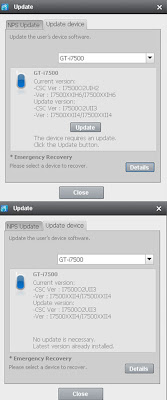
success! H6 to I4 firmware O2 UK Samsing I7500 using NPS

I backed up my installed apps to sd card using Astro first.

uninstalled the previous NPS
downloaded the new NPS
still wouldnt recognise the phone , no options in the upgrade dropdown WTF !
Anyway I manually uninstalled (via AddRemovePrograms in Control Panel) , NPS AND all the associated drivers one by one.
then restarted PC and reinstalled NPS
This time it worked!
only mode available is upgrade (i.e. the rest of the software is useless , you cant even backup!)

phone restarted just fine.
I have not done a reset yet
As reported in the forums the keyboard has changed , and for me it was no longer popping up when trying to create a text message (at this point I got worried).
However going into Gmail and creating a message and it started to work :-)

this may not be an issue if you reset the phone after the upgrade.
All data remained including apps.
I4 has the new switchers widget to toggle settings
Be interesting to see how the battery life is now .....


From Johns Car Blog

Wednesday, 30 September 2009

30k service GTI due / Seat Ibiza Sport 1.4 mpg / i7500 home screens

eeek , the service indicator popped up today !
last service was 20k in march, now thats a bit quick.

From Johns Car Blog

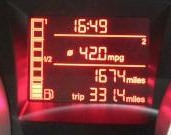
Seat Ibiza 1.4 Sport MPG
used for commuting to work , while Amy uses the GTI !

330 miles @ 42 MPG
(yes thats over 10mpg up on her usual commute , must be the driver lol)

From Johns Car Blog

Samsung i7500 home screen shots
reckoned it was time to show my phone

Main home screen
Note the 'hero' style Weather Widget Donate
as well as the Battery Status Donate
both look great , perform well and dont drain your battery, so well worth paying for.

From Johns Car Blog

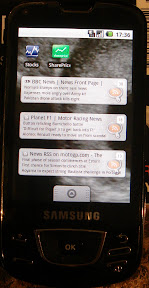
and the left swipe screen is
with RSS feed widgets and share price apps

From Johns Car Blog

right swipe screen is just various links for other apps but kept clear.

standard android has 3 screens (Left/Middle/Right) , but you can get more if you root and add a home replacement pack.

Monday, 21 September 2009

CoPilot Sat Nav for Android / Samsung i7500 Galaxy

well after using TomTom on my N95 (with a seperate GPS bluetooth unit) , it was time to try something new.

TomTom has yet to release an Android version (they have just released Iphone version though)

There are a few free android sat nav apps but by far the (only) paid option is

CoPilot 8 for Android

available from the Android Market for ?25


heres a review of TomTom VS CoPilot (on the Iphone but same really)
http://www.iphonetunes.net/index.php/apps/comments/iphonetunes_review_copilot_live_vs_tomtom/


so far so good , works well.
Had a few issues initially , as once youve downloaded the app , you need to then download maps.
You can do this via the phone (WiFi only) or using a windows app
I chose to update via WiFi to my home router.
Download was seamless but CoPilot crashed once while loading the maps.
However all is OK now (I only have UK maps 187MB)

clear display , updates quickly , my only gripes are the voices are too late (but I think this is a system setting)
Button presses are slightly delayed while going through the menus but it becomes normal after a while, and the voices themselves are a little 'mechanical' compared to TomTom

One key point is you need a car charger !!!!
because the battery live is shocking at the best of times , but running GPS on it dies very quickly.

so far so good and its nice to have a change.

Wednesday, 16 September 2009

android app : Astro : easy list installed apps and track for new updates

new to this android lark but always wanted a quick way to see what apps i have installed and keep them up to date.


Quick trawl of the interweb and the recomended candidate looks to be aTrackDog (http://www.cyrket.com/package/com.a0soft.gphone.aTrackDog).
Reviews all your installed apps and checks if an update is available , then links to store if you want to update! marvellous...
And today I found out if you hit Settings/Export Apps List , you can sent an exported list by txt or email ......
so heres mine.

Exported by aTrackDog at 07:44:17 2009/09/16

FeedR,1.0.35
Google Maps,3.1.2
Listen,1.0.0
OI File Manager,1.0.0
Abduction!,1.3
Advanced Task Killer Free,1.4.4
Aldiko,1.1.2
Astrid,2.9.0
ASTRO,1.4.1
aTrackDog,2.54
Battery Status,1.2.1
beebPlayer,0.4.9
Bluetooth Device Address,1.0.0
Bubble,1.7
Camera Firmware,1.0
com.samsung.InputEventApp,1.0.0
com.test.version,1.0.0
CSC,1.0
CurrentDataState,1.0
DataCopy,1.0
Deathclock,1.2
Factory Test,1.0
FartDroid,4.2.1
FileCopy,1.0
Finance,1.1
Google Sky Map,1.1
GPS Speedo,2.1
GPS Tracker,1.9.3
imeem Mobile,2.1.6
KeePassDroid,0.5
Layar,2.1
Locale,0.660 beta
Movies,1.6.1
MusicPlayer,1.0
My Tracks,1.0.5
Opera Mini,4.2
Places Directory,1.0.16
Quote Pro,1.2.4
Rehearsal Assistant,0.8.2
Retro Clock,1.1.1
RilErrorNotifier,1.0.0
Ringdroid,2.1
Ringo Lite,1.2.6
SharePrice 1.2.2,1.2.2
ShopSavvy,3.5.2
ShutdownApp,1.0
SlideME App Installer,1.0
Spare Parts,1.5 Only
SportsTap,2.2
Star Tour,1.0
Stocks,0.3.5
TestGPS,1.0.0
The Weather Channel,2.0.18
Toggle Settings,2.1.2
TSP firmware,1.0
Weather Widget Forecast Addon,1.2
Weather Widgets,2.4.1
WeatherBug,1.5.93
Wikidroid,1.3.1
Wikitude,7.5
WlanTest,1.0.0
wssyncmlnps,1.0.0

Total 62 applications

cool eh? means I can provide feedback on each in my blog.
Astro is a file manager utility , but you can also set up a 'backup' directory (make it the sd card , /sd) in the preferences , then export all apps (.apk) to the card.
Very handy cos I want to update my firmware and I want to be able to re-install my apps quickly.

[update Aug 2010 : this is all now superflous with the arrival of AppBrain (website and android app) , which allows sync between phone and web. The website allows you to link and summarise all your installed apps, as well as queuing for install the next time you sync]